Tuesday, July 21st, 2009
Do you spend hours trying to correct some CSS or JavaScript so that it shows up exactly the same in all browsers?
Most of the time, I am having problem with Internet Explorer 6, which most web designers tend to ignore nowadays. Sometimes, you find that the spacing is different. Sometimes, the alignment is different. These are minor problems that you can't really recall it very well, but it always happen.
You could be spending only few minutes to fix it, and that few minutes can turned up to be few hours of research.
If I can test my system on Firefox and Internet Explorer, can I actually test everything on Opera? Safari? (Yeah, I am the sole programmer and the tester of all my systems! My office is still on the way..)
To avoid spending unnecessary time to deal with the minor problems, I locked my systems to run on Mozilla Firefox only. I'm not sure whether it's a good move, but at least I have a small group of users which I can control and force them to install Firefox.
Finally, I found a website that has the ultimate answer: Do websites need to look exactly the same in every browser?
Cool, huh?
Anyhow, I would still spend time to make sure my system acts the same in every browser, if possible.. How about you?
Monday, April 28th, 2008
Only a very small percentage of the Internet population is aware of the RSS format and its benefits, and that number is growing slowly over time.
Let me do my part to spread the importance of RSS (specifically, full RSS if possible).

What is RSS?
RSS = Really Simple Syndication
RSS is a format used to deliver information from websites and pages that get updated regularly. An RSS document (which is called feed) contains either a summary or the full content from a website.
Why RSS is important to me?
I no longer read any blog directly on any website. I wouldn't be able to read that much if there is no RSS. Imagine that you have to visit website by website, to see if they have updated it. If you have 20 blogs to follow, clicking and waiting them to load would have to take a long time. What if you have 50 websites/blogs to read?
With RSS, you can see it all in one screen when you are using RSS reader. I'm using Google Reader and I'm very happy with it. Do give it a try, if you are not using any.
If you are a web content publisher, make sure your site provides RSS feed so that your readers can subscribe to it. Besides saving your followers' time, you save lots of bandwidth! Of course, you might be earning less ads revenue, but if that's so important to you, there are lots of advertising networks that allows you to put ads on your RSS feed. One good choice would be to use Google AdSense with Feedburner.
Monday, February 4th, 2008
Finally.
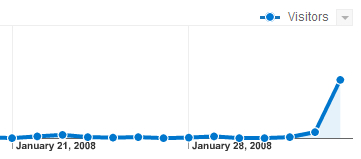
Go here to read my Google Analytics problem.
It took 2 days for the reports to finally show up with some values. Why can't Google Analytics show data instantly (like Statcounter)?
Friday, February 1st, 2008
I did not check my Google Analytics statistics for a long time. I find some weird problems when I check it recently. It shows very little pageviews -- less than 5 a day, but I'm getting hundreds of pageviews a day in my Statcounter stats.
When I look in the content section, the whole list is filled with Google search cached pages. I don't see any normal pageloads. All the URLs listed look like something similar to this:
/search?q=cache:7NM1GxZ03YgJ:blog.enrii.com/2007/05/04/make-wordpress-blog-mobile-friendly...
Why Google Analytics is not showing stats correctly? What have I do wrong?
When I last checked months ago, the stats was shown properly. I'll just replace the tracking code with the newer version and check if it's OK tomorrow.
Let me know if you know what would cause that.
Update: The tracking code update did not work at all. As I read through the help page, it suggests that improper filter will cause data not properly loaded. Since there's only one "Main" default filter, I'll just remove it from the filter settings. Is there a default filter? Or is it something I added long time ago? Anyhow, I shall see if removing it will work.
Update: Removing the filter works! If you encounter something like I did, consider checking your filters.
Thursday, April 26th, 2007
A simple search for "wordpress robots file" made me realize the importance of robots.txt file. Lots of people seems to be looking for a perfect robots.txt file for WordPress blogs.
After looking at JohnTP's article, I created one that looks like this:
User-agent: *

Disallow: /wp-content/

Disallow: /wp-admin/

Disallow: /wp-includes/

Disallow: /wp-

Disallow: /trackback/

Disallow: /cgi-bin/
For them who have never heard of robots.txt, it's basically a file that a web crawler would read to know what they should not crawl at your website.