July 17th, 2009
Recently, there are some complains about Apache server hang in the middle of data entry. It's something frustrating because after the user entered all data, clicking the submit button failed to submit the data. An experienced user will know that a page refresh resubmits the data, but not a novice user.
For your information, my PHP-MySQL system is running on Apache HTTP server version 2.2 in Microsoft Windows XP environment.
I see the following errors repeating in the log file:
[Fri Jul 03 15:20:52 2009] [warn] (OS 121)The semaphore timeout period has expired.  : winnt_accept: Asynchronous AcceptEx failed.

[Fri Jul 03 15:20:52 2009] [warn] (OS 64)The specified network name is no longer available.  : winnt_accept: Asynchronous AcceptEx failed.
If you are not sure where's the log file:
C:\Program Files\Apache Software Foundation\Apache2.2\logs\error.log
Solution that works:
As recommended by the Apache documentation, I added Win32DisableAcceptEx directive to the apache configuration file.
Apache configuration file can be found at:
C:\Program Files\Apache Software Foundation\Apache2.2\conf\httpd.conf
I am expecting this to be a Windows specific problem that should be mentioned in Platform Specific Notes for Windows, but it didn't.
Anyway, I solved my problem.
--
But... on another installation of my system, I encountered a different error in the log file.
child process exited with status 3221225477
It also causes the httpd.exe process to die off suddenly and the user is experiencing the same problem when submitting data. Every result in Google shows a different problem. It seems like the error is a generic one. Do let me know if you have any idea on how to fix this.
July 11th, 2009
I write PHP systems for companies. To keep the disaster recovery process easy, I always suggest to buy multiple computers with the exact same configuration. So, when the internal server that runs the PHP program failed, they can recover it by unplug the hard disk and plug in to another PC. Within minutes, the system is up and running again!
With few of my clients running on this same configurations, the actual disaster only happen few days ago. The lightning strike hit the server computer and it failed. Totally dead. Replacing the power supply didn't help.
So, I had to do disaster recover by moving the hard disk to another computer. I didn't realise that Microsoft Office 2007 actually detects what hardware it is running on.
This morning, the Microsoft Office didn't work. It says something like:
The Microsoft office systems detected hardware changes on your computer.
The PHP script that called Microsoft Excel COM failed. It requires reactivation. Reactivation is easy, can be done with just 2 clicks of mouse. But would Microsoft disable the license and ask me to buy another new copy?
A sane mind will agree that evil Microsoft will force me to do so. The office has spent more than RM10,000 on Microsoft licenses. They will definitely find more ways to squeeze more money from us!
Unbelievably, the reactivation was successful.
Although it good for now, I'm not sure whether I will get another message like "You are running a pirated version of Microsoft Office, please get a genuine version" tomorrow.
July 10th, 2009
I've just upgraded this blog to version 2.8.1. Planning to do so since months ago. Finally I was forced to do so because I was not able to upload any media to this blog. Not sure whether this blog got hacked again or it's a problem with the old version.
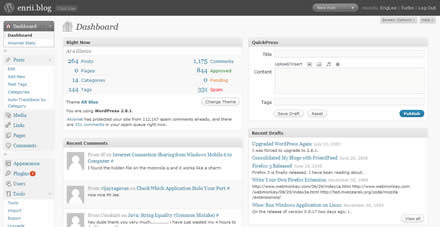
I was expecting to see more in the admin page but I only see layout changes. I remember the surprise when I last upgraded. Anyway, WordPress is already doing a very good job. I really appreciate it.
If you see any disorders when you are at my blog (or RSS readers), do drop me a comment.
July 10th, 2009
I enjoy twitter recently. I tweet almost everyday, simply to tell the world I'm currently stuck in the toilet or to share a nice quote. The urge of tweeting doesn't come all the time. But when you feels like tweeting, you get something like this:

When they don't do that they ask you to log in again and again. The "remember me" check box never work properly.
June 25th, 2009
I've always been a loyal supporter of GoDaddy. I have 10 domain names with them. Few reasons that keep me with them are their competitive price, coupon system and the reliability of their service. I think they are considered one of the pioneer who came into this business in the early stage.
You might say that you can easily find cheaper price elsewhere. And yes, I found it at Yahoo, but what happens after that? Yahoo increased the price without informing me!
However, with all the good stuffs, I don't really happy with them recently. I find that GoDaddy.com main page is taking a very long time to load. Maybe their business is so good that it slow downs the main website. For whatever reason, if they want to be in this hosting and domain business, they should always keep their main page shows up quickly to get the confidence of their users.
Is everyone in other parts of the world facing the same problem? Or is it only Malaysian facing the problem?
I think I shall switch soon, if the problem persists. I really can't afford to spend so much time to renew a domain name.